Monday, February 27, 2023

C++ Returns as Immutable

 Welcome to my Blog!

Quote of the Week

I'd Rather Piss than Pink
-Matt

Hello, lovey people who come to read my blog! This is what I've been working on in the past week. I was mostly working on the gameshow. However, I did get a chance to slip in some C++ code. Huzzah we're finally back to learning C++! Let's get into it.

 Game Show:

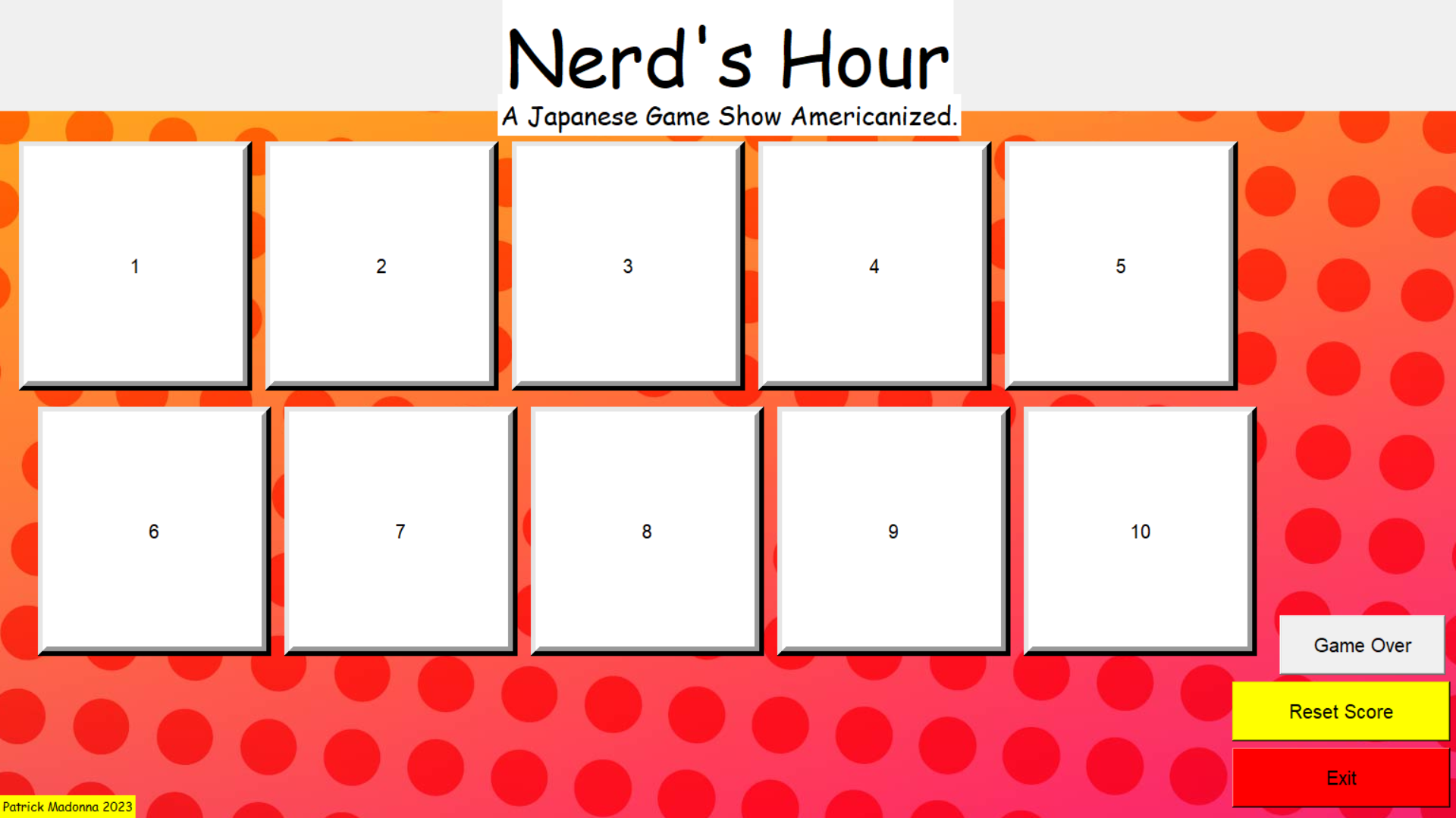
So, to start I've designed a new logo for the show and generally cleaned up the UI a bit more. I'm taking a class on graphic design, I try to use principals of this to make my programs look, and I quote "less disgusting". Here's what the design looks like right now.

If you notice the top, it looks like I've got a professional logo done for it. I don't know how professional you could call it since I made it with an online text generator, but I think the colors mesh well.


C++ Code:

Now onto the more technical stuff! This week I started a new section of the "C++ all in one book for dummies." This section claims to focus on Functional Programming. Currently, I'm learning about the principles of what makes functional programming different. This includes understanding lambdas, working with "struct", constant data, the application state, and more. This is the first time I'm seeing new built-in header libraries being used. These are <fstream> and <algorithm>. I'm excited to learn more about this and use it in my future coding ventures.

Here's a snip it of code that I was working on.

 #include <iostream>

#include <fstream>
#include <algorithm>


using namespace std;


//Avoiding Use of State Directly
//Application state is a condition that occurs when the application performs tasks that modify global data 
//It doesn't have one when using functional programming, which is good and bad. It's bad as the application has no memeory


int lineCount1(string filename) {
int lineCount = 0;
char c = ' ';
ifstream thisFile(filename);
while (thisFile.get(c)) {
if (c == '\n') lineCount++;
}
thisFile.close();
return lineCount;
}
int lineCount2(string filename) {
ifstream thisFile(filename);
return std::count
(istreambuf_iterator<char>(thisFile), istreambuf_iterator<char>(), '\n');
}
int main() {
const string filename = "ToeBeans.txt";
cout << lineCount1(filename) << endl;
cout << lineCount2(filename) << endl;
return 0;
}


//Making Imutable or Constant Data 
/*
struct Immutable {
int val{ 7 };
};
int main() {
const int *test1 = new int(5);
*test1 = 10;
const int test2{ 6 };
test2 = 11;
const Immutable test3;
test3.val = 12;
//The code should give an error as they should be immutable with means they cannot be re-assigned.
cout << *test1 << test2 << test3.val << endl;
return 0;
};
*/

That will conclude this week's post. I hope you enjoyed reading it! The main goal of this site is to show myself how far I've come about a year from now, so I really appreciate you reading this. It's like you're on a coding journey with me! But being a nerd aside, I'll see you guys next week!

-Peace💣 

Monday, February 20, 2023

Nerd's Hour - A Japanese Gameshow Americanized.

 Welcome to my Blog!


This is Nerd's Hour a Game Show that will Appear at the Comic-Con!

So first ahhhhhh IT'S CRAZY THAT I'M RUNNING A GAME SHOW, RIGHT? Oh, before I forget and start rambling with code here's your quote of the week.

Quote of the Week:
A dollar makes me holler!

-A Sorority Girl at the Cookie Sale.

Hello everyone; welcome back to my blog. I've decided to continue my non-voluntary strike of learning C++ and do actual projects in Python with Tkinter. The picture above is my game show's layout board or main menu. I got the idea for it while attending a Comic-Con in Canada. The land of the maple syrup that I love so much (I'm American).


The game works as follows. There are ten panels on the board, and a contestant comes up to the board and chooses one. After choosing one, they are prompted with any of the following categories.


Trivia - Audio Question - Guess that Silhouette - Videogame Challenge - Brutal Question


If they get the question right, they get a point, and the block disappears. They then move on to choose another question on the board. Until they get a question wrong, they will "lose their streak," as I like to say. If they had the highest streak, they stay up top on the "Winner's Couch". This is until someone beats their streak. If their streak gets beaten, they get kicked off the couch but sent away with some prizes. The whole goal is to stay on the sofa till the end of the show, so you can get the Grand Prize, which I will keep a secret for now 🤐.


Some people may say people are going to metagame and wait till the last minute to steal it away...

You'd be right if I were planning on handpicking people. This game's contestants will be chosen out of entire chance. Every audience member will be given a card with a number on it. Then I'll pull a random number within that range from a python script. It will look somewhat simple like this:


import random


maxValAudience = int(input())


print(random.randint(0,maxValAudience+1))


*Kids and Adults at home, this simple Python code can be used! (on the house 😉)


This will give everyone an equal chance to participate in the competition. Now as I said in the beginning, I did promise I'd write about the code. Here's your fix code heads. This is made up of 4 Python using the Pandas, Tkinter, and OpenCV libraries. I'll only show you a snippet of them for right now so as not to spoil all the questions for anyone participating in the show. If you'd like to purchase the rest, please refer to my email "patrickmadon130@gmail.com".


Snippet from ques.py
#This is where the information for the question contents and the button commands lie.
from tkinter import *
import pandas as pds
import Counter
import musicShadows
import os


def quesSel(Cbutton,number):


successVal = "Correct!"
failVal = "Wrong."
button1x = 1300
button1y = 550
button2y = 700

ques = Tk()
ques.title("Question")
ques.attributes('-fullscreen', True)
ques.config(background='Black')
ques.resizable(False, False)

if number == 0: #Trivia
file = "TriviaQuestions.xlsx"
fr = open("Counters\\trivia.txt")
value = int(fr.read())
fr.close()
imageref = musicShadows
# Read Excel and select a single cell (and make it a header for a column)
Ques = pds.read_excel(file, 'Sheet1', index_col=None, usecols="A", header= value,nrows=0)
choices = pds.read_excel(file, 'Sheet1', index_col=None, usecols="B", header= value, nrows=0)
Qvalue = Ques.columns.values[0] # this must always be at 0
Cvalue = choices.columns.values[0]
# Title
C = Canvas(ques, bg="#d0c0cc", height=500, width=1500)
C.place(x=10, y=10)
titleText = Label(ques, text="Trivia Question!", fg = "Green",font=('Californian FB', 80), bg="White")
titleText.place(x=10, y=40)
questionText = Label(ques, text=Qvalue, font=('Helvetica', 50), bg="#d0c0cc")
questionText.place(x=10, y=180)

# Text
qBox = Canvas(ques, bg="grey", height=300, width=1250)
qBox.place(x=20, y=550)
questionText = Label(ques, text=Cvalue, font=('Helvetica', 30), bg="grey")
questionText.place(x=30, y=580)

#Real Answer
# Reveal Button
reveal = Button(ques, text="Reveal", font=('Helvetica', 15), height=5, width=20, command=lambda
: imageref.revealAns(value,ques,file))
reveal.place(x=1000, y=550)


Here's a Picture of the one of the question prompts.


Hopefully, this week, I'll be working on structures of C++ again, but I hope you enjoyed a little showcase of my new project! Any feedback would be greatly appreciated, as long as it's constructive.

Until Next Time, Peace! 💣

Monday, February 13, 2023

Constructing A Gameshow + Finalizing the Card the Creator

 Welcome to the Blog!


Quote of the Week:
If I think my brain is Michael Jordan, that means I'm Michael Jordan
-An Online Classmate 

This previous week was pretty hectic, so I didn't get to do any lessons in C++. However I did finalize the designs for the Personal Pokémon Card Creator. I've also been working on a gameshow project called "Thrown Remotes". The screenshot above is a very early rough draft of how a question will look. 

The finalized version of the PPCC outputs a card front and back onto a webpage specific to it. This includes the weaknesses and resistances of the card and a backing that looks similar to the actual Pokémon card, with a degenerate easter egg.

This is a drastically shorter post than usually, but I hope you guys can wait until next week, when we'll get back into the swing of things. 

-Peace💣


Monday, February 6, 2023

Code Theory and Mediating a Code Car.

 Welcome to the Blog!


This previous week we mainly focused on code structures, such as "Singleton" and "Mediators." This was harder to grasp than pointers, believe it or not. I get them in concept but using them in practice might prove to be a harder beast to tame. Let's get into it.

Quote of the Week:
Yu-gi-oh is like playing Pokémon without the fun.
-Game Club Member.

So we first started with a singleton. This structure mainly focused on making sure there was only one instance of the code running at once or determining how many instances of the code are currently running. I made my own version of their "planets" code. This was to make it easier to understand and give me more experience with the structure. I'll put both in.

My Code:
#include <iostream>

using namespace std;

class instanceObj {
private:
string catName = "Default";
int instanceCounter = 0;
public:
instanceObj(string name);
int increase(int val);
int showCount();
};

instanceObj::instanceObj(string name)
{
catName = name;
cout << "Let's Begin" << endl;
}

int instanceObj::increase(int val)
{
instanceCounter += val;
return 0;
}

int instanceObj::showCount()
{
cout << catName << " Jumped " << instanceCounter << " Times!" << endl;
return instanceCounter;
}


int main() {
instanceObj catJump("Gerald");
catJump.increase(4);
catJump.showCount();

};

Their Code:

class Planet {
private:
static Planet* inst;
Planet(string name) {
cout << "Welcome to " << name << endl;
} // Pre-Constuctor
~Planet() {} //Deconstructor
public :
static Planet* GetInstance(string name);
};

Planet *Planet:: inst = 0;

Planet* Planet::GetInstance(string name) 
{
if (inst == 0) {
inst = new Planet(name);
}
return inst;
}


int main() {
Planet *MyPlanet = Planet::GetInstance("Earth");
cout << "MyPlanet address: " << MyPlanet << endl;

Planet* MyPlanet2 = Planet::GetInstance("Uranus");
cout << "MyPlanet address: " << MyPlanet2 << endl;
return 0;
}


Then I proceeded to go through observers and mediators, theses were initially pretty difficult to grasp, but in the end, I found that they're pretty self-explanatory. The observers look into your code and decide if anything is going unexpectedly or if it takes information from a class to put inside another. The mediators act as a backbone, where you make a flowchart esk diagram and make the program and classes from that. 
The example they gave was pretty lengthy, in which you were to design a hypothetical car. Due to the vast size of the example, I'll only include the header file. This should give you an idea of how big the system is.

Code:

#ifndef MEDIATOR_H_INCLUDED
#define MEDIATOR_H_INCLUDED

class CarPart;
class Engine;
class Electric;
class Radio;
class SteeringWheel;
class Wheels;
class Brakes;
class Headlights;
class AirConditioner;
class Road;

class Mediator {
public:
Engine* myEngine;
Electric* myElectric;
Radio* myRadio;
SteeringWheel* mySteeringWheel;
Wheels* myWheels;
Brakes* myBrakes;
Headlights* myHeadlights;
AirConditioner* myAirConditioner;
Road* myRoad;
Mediator();
void partChanged(CarPart* part);
};

class CarControls : public Mediator {
public:
void startCar();
void stopCar();
void pushGasPedal(int amount);
void releaseGasPedal(int amount);
void pressBrake(int amount);
void turn(int amount);
void turnOnRadio();
void turnOffRadio();
void adjustRadioVolume(int amount);
void turnOnHeadlights();
void turnOffHeadlights();
void climbHill(int angle);
void descendHill(int angle);
void turnOnAC();
void turnOffAC();
void adjustAC(int amount);
int getSpeed();
CarControls() : Mediator() {}
};

#endif // MEDIATOR_H_INCLUDED

Other than that, nothing code focused really happened. Other than new ideas for robots and tweaking some older projects here and there. Maybe next week, I'll post about one of those.

Until Next Time, Peace!💣

Monday, January 30, 2023

Shenagans and C++


Quote of the Week

"Curiosity is about Wisdom."

 - Professor Wang

Let's take a look back at the previous week and what we accomplished in code. We're still on that C++ grind and it's the first week of my sixth semester in college.

As you can see from the picture above, we first started by identifying how to use class objects and methods, using a theoretical dog. His name is Fred, say HELLO!🐶 

class MyDog {

protected: //This is the perfered method of making non-publically accessable values in C++ 

string _name;

int _weight = 300;

bool _isHealthy = false;

public:

//Properties

string getName() 

{

return _name;

}


int getWeight()

{

return _weight;

}


void setWeight(int weight) 

{

if (weight > 0) 

{

_weight = weight;

}

}


void setIsHealthy(bool isHealty) 

{

if (_weight > 200) 

{

_isHealthy = false;

}

else 

{

_isHealthy = true;

}

}


//Methods

MyDog(string name);

void DoDogRun();

};


MyDog::MyDog(string name) 

{

if (name.length() == 0) throw "Error: Couldn't create my Dog.";


MyDog::_name = name;

}


void MyDog::DoDogRun() 

{

if (MyDog::_isHealthy)

cout << MyDog::_name << "is running!" << endl;

else if (MyDog::_weight > 200)

cout << MyDog::_name << "is too fat to run!" << endl;

else

cout << MyDog::_name << "Is unhealty; see vet first" << endl;

}


int main() {

MyDog* thisDog;


try {

thisDog = new MyDog("Fred");

}

catch (const char* msg) {

cerr << msg << endl;

return -1;

}


cout << thisDog->getName() << "needs excercise" << endl;

thisDog->DoDogRun();


thisDog->setWeight(100);

thisDog->DoDogRun();


thisDog->setIsHealthy(true);

thisDog->DoDogRun();


delete thisDog;

thisDog = 0;


return 0;

}


This code serves the purpose of more practice using classes and pointers to hold instances of the object.

I then started working on trying to better understand derived classes and how they function. I have somewhat of an idea out of the gate, having some experience with Python classes. However, it works a little different with its syntax. To start let me tell you what a derived class is. It's a class that shares protected information with a parent class, making it a sort of child. This derived class can be invoked separately from the base class when written properly. It's used for multi-stepped projects or to keep regular users from accessing private variables you wouldn't want to be changed.

The example given to explain this is probably one of my favorites, as it involves frozen pizza haha.

class FrozenFood {

private:

int Price;

protected:

int Weight;

public:

FrozenFood(int APrice, int Aweight);

int GetPrice();

int GetWeight();

virtual void BakeChemistry();

};


class FrozenPizza : public FrozenFood { //This a good example of a derived class from the Frozen Food

protected:

int Diameter;

public:

FrozenPizza(int APrice, int AWeight, int ADiameter);

void DumpInfo();

void BakeChemistry();

};


class DeepDishPizza : public FrozenPizza {

private:

int Height;

public:

DeepDishPizza(int APrice, int AWeight, int ADiameter, int AHeight);

void DumpDensity();

void BakeChemistry();

};


//Frozen Food Functions

FrozenFood::FrozenFood(int APrice, int AWeight) {

Price = APrice;

Weight = AWeight;

}


int FrozenFood::GetPrice() {

return Price;

}


int FrozenFood::GetWeight() {

return Weight;

}


void FrozenFood :: BakeChemistry() 

{

cout << "To Bake it put into Oven for 20-40 Minutes" << endl;

}


//Frozen Pizza Functions

FrozenPizza::FrozenPizza(int APrice, int AWeight, int ADiameter) : FrozenFood(APrice, AWeight) {

Diameter = ADiameter;

};


void FrozenPizza :: BakeChemistry()

{

cout << "To Bake it put into Oven for 20 Minutes" << endl;

}


void FrozenPizza :: DumpInfo() {

cout << "\tFrozen pizza info" << endl;

cout << "\t\tWeight:" << Weight << "ounces" << endl;

cout << "\t\tDiameter" << Diameter << " inches" << endl;

}


//DeepDish Pizza Functions

DeepDishPizza::DeepDishPizza(int APrice, int AWeight, int ADiameter, int AHeight) : FrozenPizza(APrice, AWeight, ADiameter) {

Height = AHeight;

}


void DeepDishPizza::DumpDensity() {

//Calculate the pounds per cubic food of deep dish pizza

cout << "\tDensity: ";

cout << Weight * 12 * 12 * 12 * 14 / (Height * Diameter * 22 * 16);

cout << " pounds per cubic foot" << endl;

}


void DeepDishPizza :: BakeChemistry()

{

cout << "To Bake it put into Oven for 30 Minutes" << endl;

}


void Bake(FrozenFood *) 

{

cout << "Cooking" << endl;

}


int main() 

{

cout << "Thin crust pepperoni" << endl;

FrozenPizza pepperoni(450, 12, 14);

pepperoni.DumpInfo();

pepperoni.BakeChemistry();

cout << "\tPrice " << pepperoni.GetPrice() << " cents" << endl;


cout << "Deep Dish extra-cheese" << endl;

DeepDishPizza extracheese(550, 21592, 14, 3);

extracheese.DumpInfo();

extracheese.DumpDensity();

extracheese.BakeChemistry();

cout << "\tPrice: " << extracheese.GetPrice() << " cents" << endl;

return 0;

}


That's all I would like to share for this week, next week expect something a little more theoretical, like code design patterns. Until then, Peace 💣

Monday, January 23, 2023

C++, Python to Executable, and Minecraft Shenanigans.

 Welcome Back to my Blog!


Where we recap what we did the previous week, I was moving from home to college to start my spring semester, so it's going to be shorter than last time, but let's get into it.

Quote Of the Week

"Sorry your dog died, I guess." 
- Redditor

This week we dabbled in C++, starting a new chapter of the book so let's start with that.


C++

This week we started Chapter 11, which is called "Planning and Building Objects". I made it to the "Building Hierarchies" subsection. Previous to this section, we went over how to properly use classes and children functions, methods, and protected vs. private variables. It was more conceptual writing rather than code, so I only have this "Dog Health" script to show. I would have gotten farther, but due to the hectic week, I could only get so far.

Code
#include <iostream>

using namespace std;

class MyDog {
protected: //This is the perfered method of making non-publically accessable values in C++ 
string _name;
int _weight = 300;
bool _isHealthy = false;
public:
//Properties
string getName() 
{
return _name;
}

int getWeight()
{
return _weight;
}

void setWeight(int weight) 
{
if (weight > 0) 
{
_weight = weight;
}
}

void setIsHealthy(bool isHealty) 
{
if (_weight > 200) 
{
_isHealthy = false;
}
else 
{
_isHealthy = true;
}
}

//Methods
MyDog(string name);
void DoDogRun();
};

MyDog::MyDog(string name) 
{
if (name.length() == 0) throw "Error: Couldn't create my Dog.";

MyDog::_name = name;
}

void MyDog::DoDogRun() 
{
if (MyDog::_isHealthy)
cout << MyDog::_name << "is running!" << endl;
else if (MyDog::_weight > 200)
cout << MyDog::_name << "is too fat to run!" << endl;
else
cout << MyDog::_name << "Is unhealty; see vet first" << endl;
}

int main() {
MyDog* thisDog;

try {
thisDog = new MyDog("Fred");
}
catch (const char* msg) {
cerr << msg << endl;
return -1;
}

cout << thisDog->getName() << "needs excercise" << endl;
thisDog->DoDogRun();

thisDog->setWeight(100);
thisDog->DoDogRun();

thisDog->setIsHealthy(true);
thisDog->DoDogRun();

delete thisDog;
thisDog = 0;

return 0;
}

Python to Executable 

Now I also researched how to turn a .py file into a .exe to facilitate a transfer of my programs without the need for people to download python and have all the necessary scripts. The best and easiest way to do this is to use an application called "auto-py-to-exe" a quick google search should show you a documentation page and a youtube video or two on it.

The program I put into an executable was the PPCC (Personal Pokemon Card Creator) that was previously shown here. I even made a new icon for it; take a look.
If you'd like to see the functionality of this card creator, you can take a look at my post about it here (https://patricksbb.blogspot.com/2022/12/personal-pokemon-card-creator.html). I will release this ".exe" file soon, so please be on the lookout; if you'd like to see the raw code, you can go to my GitHub page linked above. If you use the code, please credit it to me.


Minecraft

We have the server up and joinable, and the starting area has been fully completed, as shown in the picture above. I will keep you posted and maybe showcase the builds of the week.


That's it for last week. Be sure to come back next Monday to find another post at the same spot, 
the same place until then
-Peace💣

Monday, January 16, 2023

Making an Minecraft Server and More C++

Welcome to my blog; if this is your first time here, be sure to look at my other posts and tell me what you think of them. Now, it's time to look at what we did the past week. 

Quote of the Week

Kirby's not cool; he's ugly.

-Little Kid at Target

At the start of the week, we continued studying C++; we made it to the second section of the 'C++ All-in-One for Dummies,' which covers Advanced C++ features. The portions that we went over this week are how to make classes, what an enum is, what constants are and why we use them, how to make children classes, how to comment correctly, how to use 'cin', and, preprocessor directives.

 I've decided to paste in the Code rather than take a picture, so if you need it in the future, it's as simple as 'Ctrl-c'.

main.ccp (Classes Maybe Objects)

#include <iostream>

#include "Pen.h"

#include "Oven.h"

#include "Cheese.h"


using namespace std;

void AddOne(int* number);

int main() 

{

cout << "Hello World" << endl;

//enum MyColor {blue, red, black, green}; // enum creates a new type, such as an int or float


//MyColor inkcolor = blue;

//MyColor shellcolor = black;


int CheeseBlocks = 0;

const int MyInt = 3; // a constant inacted by using the "const" varriable unchangable even when you pass a reference to it or another function 

Fruit* Apple = new Fruit();

Cheese* asiago = new Cheese("Meh.");

CheeseBlocks++;

Cheese* limburger = new Cheese("Atrocious. Bleh");

CheeseBlocks++;

asiago ->eat();

Apple->what();

CheeseBlocks --;

limburger->rot();

CheeseBlocks--;

cout << endl;

cout << "Cheese count: " << CheeseBlocks << endl;

cout << "asiago: " << asiago->status << endl;

cout << "limburger: " << limburger->status << endl;

delete asiago;

delete limburger;

cout << endl;


//Raw Pointers

Pen* MyPen;

MyPen = new Pen;

MyPen->inkColor = grey;

cout << MyPen->inkColor << endl;

delete MyPen;

MyPen = 0;


//Smart Pointers

unique_ptr<Pen> MyPen2;

MyPen2.reset(new Pen());

MyPen2->inkColor = red;

cout << MyPen2->inkColor << endl;

MyPen2.reset();


//Making String and Pointer Copies (Aliases)

string OrigStr = "Hello";

const string& StringCopy(OrigStr); // The copy that cannot be modified

OrigStr = "Goodbye";

cout << OrigStr << endl;

cout << StringCopy << endl;


Oven Tom;

Pen FP; //This is your instance of the class Pen (Favorite Pen) is an Object

FP.inkColor = red;

FP.shellColor = red;

FP.capColor = grey;

FP.style = ballpoint;

FP.length = 6.0;

FP.brand = "Apperture Science";

FP.inkLevelPercent = 35;


Pen WP; //This is your instance of the class Pen (Worst Pen)

WP.inkColor = black;

WP.shellColor = grey;

WP.capColor = grey;

WP.style = felt_tip;

WP.length = 3.0;

WP.brand = "Apperture Science";

WP.inkLevelPercent = 75;


cout << "This is my favorite pen" << endl;

cout << "Color: " << FP.inkColor << endl;

cout << "Brand: " << FP.brand << endl;

cout << "Ink Level: " << FP.inkLevelPercent << "%" << endl;

FP.write_on_paper("Hello I'am the Mystic PEN OF POWER!");

cout << "Ink Level: " << FP.inkLevelPercent << "%" << endl;

cout << endl;

Tom.Bake(500);

return 0;

}

main.ccp (AdvancedC++Features)

#include <iostream>

#include <sstream> // the library that contains istringstream, ostringstream

#include <conio.h> // This library gives you better access to the console.

//istringstream - if you want to READ from a stringstream

//ostringstream - if you want to WRITE to a string stream


using namespace std;

// Note to self: put these in a class to utilize later.

int stringToNumber(string myString){

//Converts from string to number 

istringstream converter(myString);

//Result of method

int result;


//function to perform and return the resuts

converter >> result;

return result;

}


string enterOnlyNumbers() { //The main use of this function is to use if you cannot for some reason use 'cin'

string numAsString = ""; //Holds the numeric string.

char ch = _getch(); //Obtains a single character


// Keep requesting characters until the user presses Enter.

while (ch != '\r') { // \r is the Enter Key

//Add characters only if they are numbers.

if (ch >= '0' && ch <= '9') {

cout << ch;

numAsString += ch;

}

//Get the next character from the user.

ch = _getch();

}

return numAsString;

}


string enterPassword() {

// Holds the password string.

string numAsString = "";

//Obtains a single character from the user.

char ch = _getch();


// Keep requesting characters until the user presses Enter.

while (ch != '\r') { //remeber that '\r' is the enter key.

cout << '*';

//Add the character to the password string.

numAsString += ch;

// Get the next character from the user.

ch = _getch();

}

return numAsString;

}


string numberToString(int number) {

//Converts from number to string.

ostringstream converter;


//Perform the conversion and return the results

converter << number;

return converter.str();

}


int main() 

{

// Just a basic name-entering 

string name;

cout << "What's your name? ";

cin >> name;

cout << "Hello " << name << endl;


//Now you are asked to enter a number,

//but the computer allow you to enter anything!

int x;

cout << endl;

cout << "Enter a number, any number! ";

cin >> x;

cout << "You chose " << x << endl;


//This time you can only enter a number

cout << endl;

cout << "This time enter a number!" << endl;

cout << "Enter a number, any number! ";

string entered = enterOnlyNumbers();

int num = stringToNumber(entered);

cout << endl << "You entered " << num << endl;


// Now enter a password!

cout << endl;

cout << "Enter your password! ";

string password = enterPassword();

cout << "Shhhh it's " << password << endl;


cout << endl;

//Contains Theoretical number of kids.

float numberOfKids;

//Contains an actual number of kids.

int actualKids;


/* You can theoretically have 2.5 kids, but in the real world, you can't.

* Convert the theoretical number of kids to a real number by truncating numberOfKids 

and display the results.

*/

numberOfKids = 2.5;

actualKids = (int)numberOfKids;

cout << "Float to Interger" << "\tTruncated" << endl;

cout << numberOfKids << "\t\t\t" << actualKids << endl;


//This time we'll use 2.9 kids

numberOfKids = 2.9;

actualKids = (int)numberOfKids;

cout << numberOfKids << "\t\t\t" << actualKids << endl;


//The following process rounds the number rather than

//trunicating it. We do it using these two numbers.

numberOfKids = 2.5;

actualKids = (int)(numberOfKids + .5);

cout << "Float to Interger" << "\tRounded" << endl;

cout << numberOfKids << "\t\t\t" << actualKids << endl;


//This time we'll use 2.1 kids

numberOfKids = 2.1;

actualKids = (int)(numberOfKids + .5);

cout << numberOfKids << "\t\t\t" << actualKids << endl << endl;


//In this case we use stringToNumber() function to perform this conversion.

cout << "String to number" << endl;

int numx = stringToNumber("12345") * 50;

cout << numx << endl << endl; // TYhere is no typo here, this just makes the next cout push to the next line.


//In this case we use numberToString() function to perform this conversion.

cout << "Number to string" << endl;

string myString = numberToString(8675309);

cout << "Here's my number:" << "\t" << myString << endl;

return 0;

}


Near the end of the week, I decided to do a 'side-mission' of sorts. I wanted to make a Minecraft server since my friends and I have been getting really into the game recently. To accomplish this, I booted up my old Linux machine and connected it to my router. I started researching "How does one make a Minecraft server?".  I eventually found a really helpful tutorial online that was really straightforward; I'll link it down below. However, this tutorial is only for Ubuntu, and I'm not quite sure about the rest of the OSes, but it seems pretty straightforward.


That's it for this week, put in the comments what you'd like to see, and how you take your coffee. 

-Peace💣


DOCTOR! The Calculator is Terminal!! The C++ variety ;)

    Hello, and Welcome to my Blog!  If you're a returning visitor, ...Hello Again! Quote of the Week: ..but fear itself isn't worthy...